AI Agent Architecture Patterns for Enterprise Systems
Most teams pick an agent architecture based on what they saw in a demo. Then they spend months refactoring when it doesn't scale. Here are the four patterns that actually work in production.
A fintech team I worked with last year built their AI agent architecture patterns around a single-agent design. One LLM call with 14 tools attached. It worked great in the demo. It even worked in staging. Then they hit production traffic and the whole thing fell apart. The agent would pick the wrong tool 30% of the time. Latency spiked to 45 seconds per request. Error recovery was nonexistent because every failure meant restarting the entire workflow from scratch.
They spent three months refactoring into a multi-agent setup. That's three months of engineering time they could have saved by choosing the right architecture from day one. I've seen this pattern repeat across a dozen enterprise teams. The architecture decision you make in week one determines whether your agent system works at scale or collapses under its own weight.
Here are the four architecture patterns we use at Dyyota, when each one fits, and where teams get tripped up.
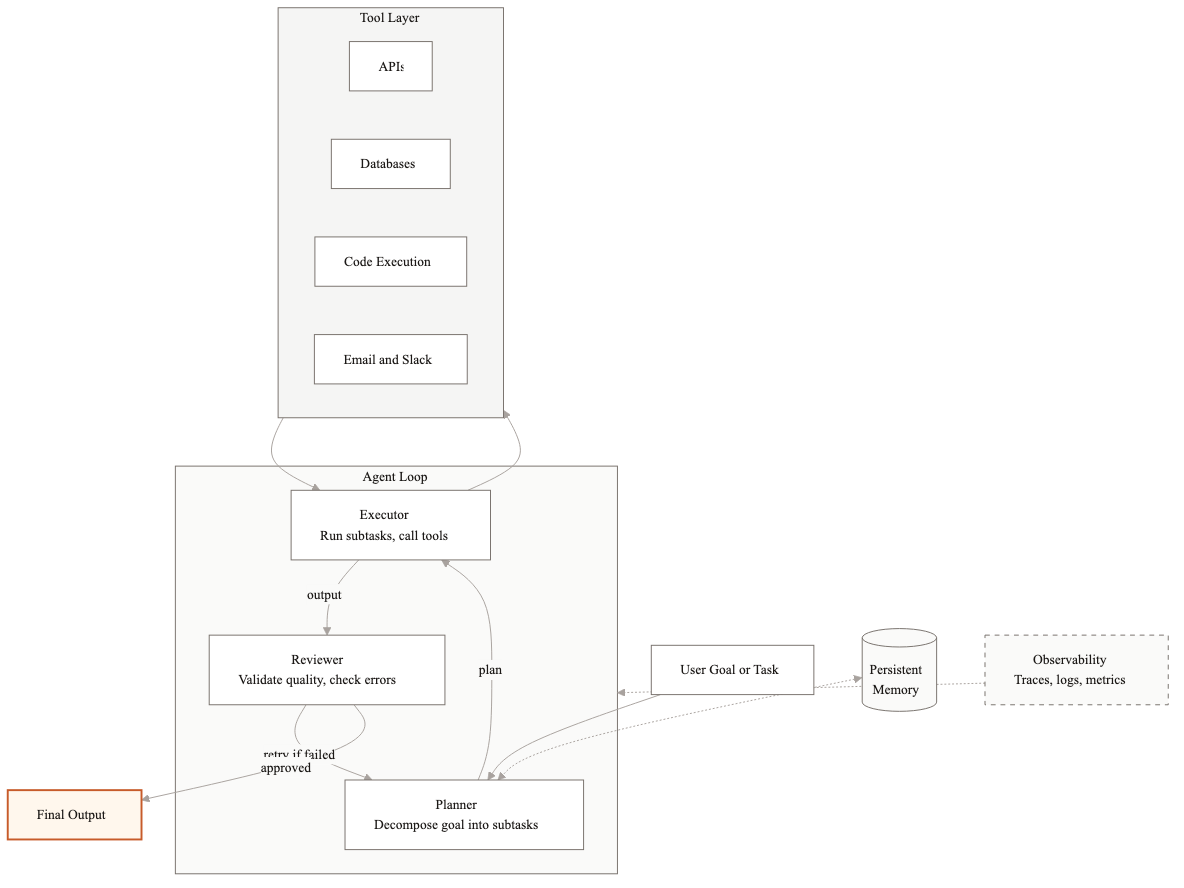
Pattern 1: Single agent with tools
This is the simplest pattern. One LLM acts as the brain. You give it a set of tools (APIs, database queries, code execution) and let it decide which tools to call and in what order. The LLM plans, executes, and reviews its own work in a single loop.
When to use it
Single-agent works when the task is well-defined and narrow. Think: an agent that answers customer questions by searching a knowledge base and pulling up account details. Or an agent that extracts specific fields from a single document type. The key constraint is that the agent should need fewer than 5-6 tools and the workflow should complete in under 4-5 steps.
How it works in practice
We built a single-agent system for a logistics company that needed to track shipment status across three carrier APIs. The agent receives a tracking request, decides which carrier API to call based on the tracking number format, fetches the status, and returns a structured response. Total tool count: 3 carrier APIs plus one internal database lookup. Average completion: 2-3 steps. Latency under 4 seconds.
Tradeoffs
- →Pros: simple to build, simple to debug, low latency, easy to test
- →Cons: breaks down past 6-7 tools because the LLM struggles to pick the right one, no separation of concerns, one failure kills the whole workflow
- →Watch out for: tool descriptions that are too similar to each other. The LLM will confuse them constantly.
Pattern 2: Planner-Executor-Reviewer
This is the pattern we use most often at Dyyota. Three distinct roles, usually backed by separate LLM calls with different system prompts and sometimes different models. The Planner breaks the goal into steps. The Executor runs each step using tools. The Reviewer checks the output and decides whether the goal is met or whether the Planner needs to try again.
When to use it
This pattern fits when the workflow has 5-15 steps, when the output quality matters enough to warrant a review pass, and when errors in one step should not necessarily abort the whole workflow. It's the sweet spot for most enterprise use cases: document processing pipelines, multi-step customer service workflows, compliance checks that require gathering information from multiple sources.
How it works in practice
We use this pattern for a contract review system. The Planner reads the contract and generates a checklist: identify parties, extract key dates, flag non-standard clauses, check against company policy templates. The Executor processes each checklist item using specialized extraction tools. The Reviewer validates each extraction against the source document and flags items with low confidence for human review. If the Reviewer finds a problem, it sends specific items back to the Executor rather than restarting the entire process.
Average contract takes 45-60 seconds to process. Without the Reviewer, error rates were 18%. With the Reviewer, they dropped to 4%. The Reviewer catches things like misidentified parties, dates pulled from the wrong section, and clauses that were flagged as non-standard but actually match the template.
Tradeoffs
- →Pros: reliable output quality, graceful error recovery, each component can be tested independently, you can use a cheaper model for execution and a smarter model for planning and review
- →Cons: higher latency than single-agent (3 LLM calls minimum per step), more complex to build and maintain, requires careful prompt engineering for each role
- →Watch out for: infinite review loops. Set a max retry count. Three retries is usually the right number before escalating to a human.
Pattern 3: Multi-agent with orchestrator
When the workflow is too complex for a single Planner-Executor-Reviewer loop, you break it into specialist agents, each responsible for a specific domain. An orchestrator agent sits on top and routes tasks to the right specialist, collects results, and manages the overall workflow.
When to use it
This pattern works when different parts of the workflow require fundamentally different skills. For example, a financial analysis pipeline might need one agent that's good at extracting numbers from PDFs, another that's good at running calculations, and a third that's good at generating narrative summaries. Each specialist has its own tools, its own system prompt, and potentially its own model.
How it works in practice
We built a multi-agent system for an insurance company that processes claims. The orchestrator receives an incoming claim and routes it through four specialist agents: a document agent that extracts information from the claim form and supporting documents, a policy agent that checks the claim against the customer's policy, a fraud agent that runs anomaly detection and cross-references against known fraud patterns, and a decision agent that compiles everything and generates a recommendation.
Each specialist agent is itself a Planner-Executor-Reviewer. The orchestrator manages dependencies (the policy agent needs output from the document agent) and handles failures at the agent level (if the fraud agent times out, the orchestrator can proceed with a flag for manual fraud review).
Tradeoffs
- →Pros: each specialist can be developed, tested, and improved independently. Teams can work in parallel. Complex workflows become manageable.
- →Cons: orchestration logic is hard to get right. Inter-agent communication adds latency and potential failure points. Debugging requires tracing across multiple agents.
- →Watch out for: the orchestrator becoming a bottleneck. If it makes bad routing decisions, every downstream agent suffers. Invest heavily in orchestrator testing.
Pattern 4: Swarm / Decentralized agents
In this pattern, there is no central orchestrator. Multiple agents work on the same problem simultaneously, each exploring different angles. They share findings through a shared memory or message bus and build on each other's work. Think of it like a research team where everyone investigates independently and reconvenes to synthesize.
When to use it
Swarm architecture fits research and analysis tasks where there is no single correct path. Competitive intelligence gathering. Literature review across hundreds of papers. Market analysis where you need to explore multiple hypotheses. The common thread: the problem benefits from parallel exploration rather than sequential execution.
How it works in practice
We used a swarm pattern for a due diligence system. Five agents each research a different aspect of a target company: financials, legal history, market position, team background, and technology stack. They write findings to a shared workspace. A synthesis agent reads all findings and produces the final report. No agent waits for another. They all run in parallel, and the synthesis step happens after a time limit or when all agents signal completion.
The result: a due diligence report that used to take an analyst 3-4 days is drafted in 20 minutes. The human analyst then spends 2-3 hours reviewing and refining instead of 3 days compiling from scratch.
Tradeoffs
- →Pros: fastest total execution time for parallelizable tasks, resilient to individual agent failures, scales horizontally
- →Cons: hardest to debug, shared memory management is tricky, duplicate work is common, synthesis quality depends heavily on prompt engineering
- →Watch out for: cost. Running 5 agents in parallel with multiple LLM calls each can get expensive fast. Set token budgets per agent and monitor spend closely.
How to choose
Start with the simplest pattern that could work. Single-agent handles more than you'd expect if the task is narrow. Move to Planner-Executor-Reviewer when quality matters and the workflow has more than 4-5 steps. Go multi-agent when different parts of the workflow require genuinely different capabilities. Use swarm only when the task is inherently parallel and exploratory.
Whatever pattern you choose, invest in observability from the start. Every agent action should be logged with timestamps, inputs, outputs, and token counts. When something goes wrong in production (and it will), trace logs are the difference between a 10-minute fix and a week-long investigation.
Related guides
AI Agent Development Cost: What You'll Actually Pay in 2026
AI agent development costs range from $20K to $300K+ depending on complexity, integrations, and compliance. Here is a full breakdown of what drives the price.
AI Agent Market Size in 2026: Growth, Trends, and What It Means
The AI agent market is $7.6B in 2025 and projected to hit $183B by 2033. Here is what is driving growth and where enterprise demand is headed.
Securing AI Agents in Enterprise Environments
An AI agent that can read your database can also leak it. One that can process refunds can also process unauthorized ones. Here's how we lock down agent systems for enterprise production.
Related Use Cases
AI Document Processing and Extraction
Most enterprises process thousands of documents weekly using manual workflows built for a pre-AI world. We replace those workflows with AI systems that extract, validate, and route document data automatically.
AI Customer Support Automation
Customer support teams spend most of their time answering the same questions. We build AI systems that handle the routine volume automatically, so your agents focus on the interactions that actually need a human.