AI Agents vs Chatbots: They're Not the Same Thing
Every week someone tells me they want to build an AI agent when what they actually need is a chatbot. Or worse, they build a chatbot when they need an agent. Here's how to tell the difference.
When people say AI agents vs chatbots, they often use the terms interchangeably. I hear it in almost every initial call with enterprise clients. "We want to build an AI agent" usually means "we want a chatbot that answers questions from our internal docs." And "we built a chatbot" sometimes means they built something that actually takes actions and makes decisions, which is an agent. The confusion costs real money because the two require fundamentally different architectures, testing approaches, and security models.
Let me explain the actual difference with a concrete example, then walk through when you need which one.
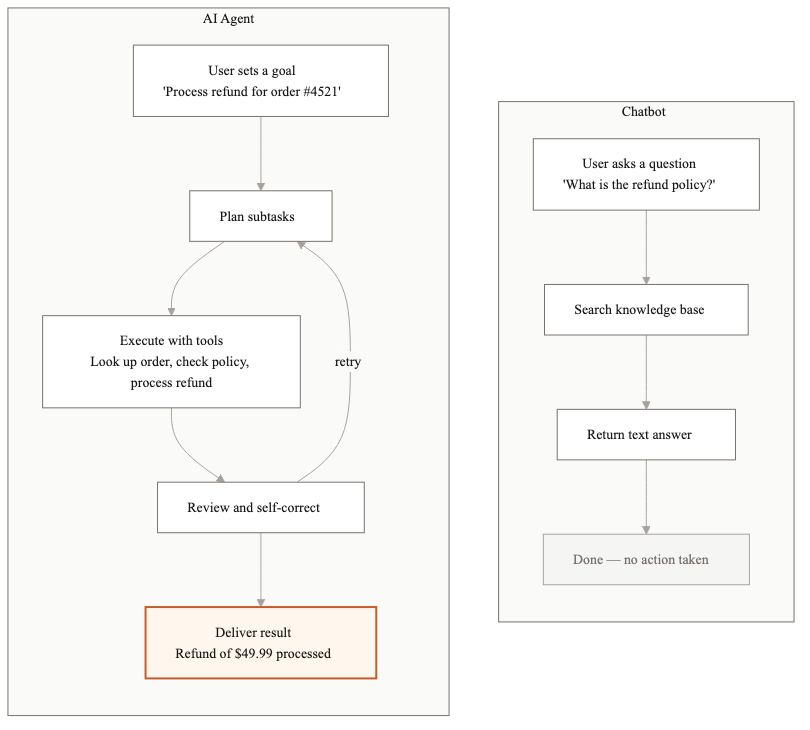
The refund scenario
A customer sends a message: "I ordered the wrong size. I need a refund."
A chatbot looks up the refund policy in the knowledge base and responds: "You can request a refund within 30 days of purchase. Please visit our returns page at example.com/returns or call our support line at 1-800-555-0100." That's the end of the interaction. The chatbot answered the question. The customer still has to do the actual work.
An AI agent does something different. It pulls up the customer's order history, identifies the most recent order, checks whether it's within the 30-day return window, verifies the item is eligible for refund, initiates the refund in the payment system, generates a return shipping label, and sends the customer a confirmation email with the label attached. The customer's problem is actually solved.
That's the core distinction. A chatbot retrieves information. An agent takes action.
What defines a chatbot
A chatbot is a question-answering system. You give it a knowledge base (documents, FAQs, product manuals) and it answers questions from that knowledge base. Most modern chatbots use RAG (retrieval-augmented generation): the system searches for relevant documents, includes them in the prompt, and the LLM generates a natural language answer.
- →Stateless or minimally stateful. Each conversation might carry some context, but the chatbot doesn't remember you across sessions or track ongoing processes.
- →Read-only. It retrieves and presents information. It doesn't create, update, or delete anything.
- →No decision-making. It doesn't evaluate options or choose actions. It surfaces what's in the knowledge base.
- →Single-step. One question, one answer. No multi-step workflows.
One thing worth calling out: modern chatbots with good RAG are surprisingly capable. I've seen well-tuned chatbots answer nuanced questions about 500-page regulatory documents with 92% accuracy. The technology is mature. If your use case fits a chatbot, don't overcomplicate things by building an agent.
What defines an AI agent
An AI agent is a system that plans, executes, and verifies multi-step workflows using tools. The "tools" part is critical. An agent can call APIs, query databases, run calculations, send emails, update records, and interact with external systems.
- →Stateful. It tracks the progress of a workflow, remembers what it's already done, and knows what's left.
- →Read-write. It takes actions that change things in the real world: processing refunds, creating tickets, updating CRM records.
- →Decision-making. It evaluates conditions and chooses between different paths. If the order is within 30 days, process the refund. If not, escalate to a human.
- →Multi-step. It breaks complex goals into sub-tasks and executes them in sequence, handling errors along the way.
Agents also carry a different risk profile. Because they take actions, they can cause real damage if they make wrong decisions. A chatbot that gives a bad answer is annoying. An agent that processes an incorrect $10,000 refund is a financial problem. This distinction matters when you're thinking about testing and guardrails.
When a chatbot is the right choice
Chatbots are the right choice more often than most people expect. If your primary need is helping users find information, a chatbot is simpler, cheaper, and faster to deploy.
- →Internal knowledge base search. Employees asking questions about company policies, benefits, or procedures.
- →Product FAQ and documentation. Customers asking how things work, what features exist, or how to troubleshoot common issues.
- →Pre-sales questions. Prospects asking about pricing tiers, feature comparisons, or integration capabilities.
- →HR and IT helpdesk (tier 1). Simple questions that have known answers in existing documentation.
A well-built chatbot with good RAG can handle 60-70% of support tickets for these use cases. The cost is typically $0.01-0.03 per interaction, and you can go from zero to production in 4-6 weeks.
When you need an agent
You need an agent when answering the question isn't enough. When the user needs something done, not something explained.
- →Order management. Processing returns, modifying orders, applying credits.
- →Complex support workflows. Diagnosing problems that require checking multiple systems, then taking corrective action.
- →Document processing pipelines. Extracting data from documents, validating it against business rules, and routing it to downstream systems.
- →Approval workflows. Gathering information, checking against policies, making a recommendation, and routing to the right approver.
- →Compliance monitoring. Continuously checking transactions or documents against regulatory rules and flagging violations.
Agents cost more to build and run. A typical enterprise agent project takes 8-14 weeks and costs $0.05-0.15 per interaction because of the multiple LLM calls and tool executions involved. But the ROI is usually much higher because agents replace entire workflow steps, including the parts that used to require a human clicking through three different screens.
The cost comparison
I'll be specific because vague comparisons aren't useful.
- →Chatbot: 4-6 weeks to build, $30K-60K development cost, $0.01-0.03 per interaction, handles 60-70% of simple queries
- →AI Agent: 8-14 weeks to build, $80K-200K development cost, $0.05-0.15 per interaction, automates end-to-end workflows that previously required human intervention
- →Hybrid (most common): chatbot handles simple questions, escalates to agent when action is needed. Best of both worlds. Build the chatbot first, add agent capabilities incrementally.
The hybrid approach
Most production systems we build at Dyyota are hybrids. The first layer is a chatbot that handles informational queries. When the chatbot detects that the user needs action taken (rather than a question answered), it hands off to an agent. This keeps costs low for the 60-70% of interactions that are simple questions, while still automating the complex workflows.
The handoff detection is its own engineering challenge. We use a classifier that looks at the user's intent and conversation history. Sentences like "can you process my refund" or "update my shipping address" trigger the agent. Questions like "what's your refund policy" stay with the chatbot. Getting this classifier right is worth spending time on because misrouting in either direction hurts the user experience.
Architecture differences you'll feel immediately
The technical gap between chatbots and agents shows up on day one of building. A chatbot needs a vector database for retrieval, an LLM for generation, and a basic conversation interface. That's three components. An agent needs all of that plus a tool execution framework, state management, error handling for each tool, permission controls for each action, and audit logging for every decision. You're looking at 8-12 components minimum.
Testing is also fundamentally different. For a chatbot, you test whether the answers are accurate and relevant. You build an eval dataset of question/answer pairs and measure retrieval precision and answer quality. For an agent, you test whether the actions are correct and safe. You need to verify that the agent calls the right API with the right parameters, handles failures gracefully, respects permission boundaries, and never takes an action it shouldn't. Agent testing is closer to integration testing than unit testing.
Security requirements diverge sharply too. A chatbot that leaks information from the knowledge base is a problem. An agent that executes unauthorized transactions is a much bigger problem. Agents need permission boundaries, rate limits on high-risk actions, and human-in-the-loop controls for anything above a certain dollar threshold or risk level. We've seen teams spend 30-40% of their agent development budget on security and guardrails alone. With chatbots, that number is closer to 10-15%. If your timeline or budget is tight, this difference alone might push you toward the chatbot path for v1.
The distinction between chatbots and agents isn't academic. It determines your architecture, your timeline, your budget, and your security requirements. Get clear on what your users actually need before you start building. Talk to 10 users. Watch what they do after the chatbot answers their question. If they immediately go to another system to take action on that answer, you probably need an agent for that workflow. If they read the answer and move on, a chatbot is doing its job. The answer is usually simpler than you think.
Related guides
AI Agent Architecture Patterns for Enterprise Systems
Most teams pick an agent architecture based on what they saw in a demo. Then they spend months refactoring when it doesn't scale. Here are the four patterns that actually work in production.
AI Agent Development Cost: What You'll Actually Pay in 2026
AI agent development costs range from $20K to $300K+ depending on complexity, integrations, and compliance. Here is a full breakdown of what drives the price.
AI Agent Market Size in 2026: Growth, Trends, and What It Means
The AI agent market is $7.6B in 2025 and projected to hit $183B by 2033. Here is what is driving growth and where enterprise demand is headed.
Related Use Cases
AI Customer Support Automation
Customer support teams spend most of their time answering the same questions. We build AI systems that handle the routine volume automatically, so your agents focus on the interactions that actually need a human.
Enterprise Knowledge Base Search with AI
Employees waste hours every week searching for information that exists somewhere in the organization but is impossible to find. We build AI retrieval systems that answer natural language questions accurately, with sources cited.