RAG Architecture for Enterprise: A Practical Guide
You have probably seen a RAG demo that looks amazing and then tried it on your own docs and got garbage. Here is a practical guide to building RAG systems that actually work at enterprise scale.
You have probably seen a RAG demo that looks amazing. Someone pastes in a few PDFs, asks a question, and gets a perfect answer with citations. Then you try it on your own enterprise docs and the answers are wrong, incomplete, or pulled from the wrong section entirely. RAG architecture is the reason. The difference between a demo and a production system comes down to how you handle every stage of the pipeline.
I have built RAG systems for legal teams, financial services, and healthcare companies. The architecture decisions at each layer compound. Get chunking wrong and nothing downstream can fix it. Pick the wrong retrieval strategy and your accuracy tanks on multi-part questions. This guide covers what actually matters at each stage.
What RAG actually is
RAG stands for Retrieval-Augmented Generation. The core idea is simple: instead of asking an LLM to answer from memory, you first retrieve relevant documents from your knowledge base, then pass those documents to the LLM as context along with the user's question. The model generates an answer grounded in your actual data.
This is different from fine-tuning, where you change the model's weights. In RAG, the model stays the same. You are controlling what information it sees at query time. That separation matters for enterprise because it means you can update your knowledge base without retraining anything, and you can trace every answer back to a specific source document.
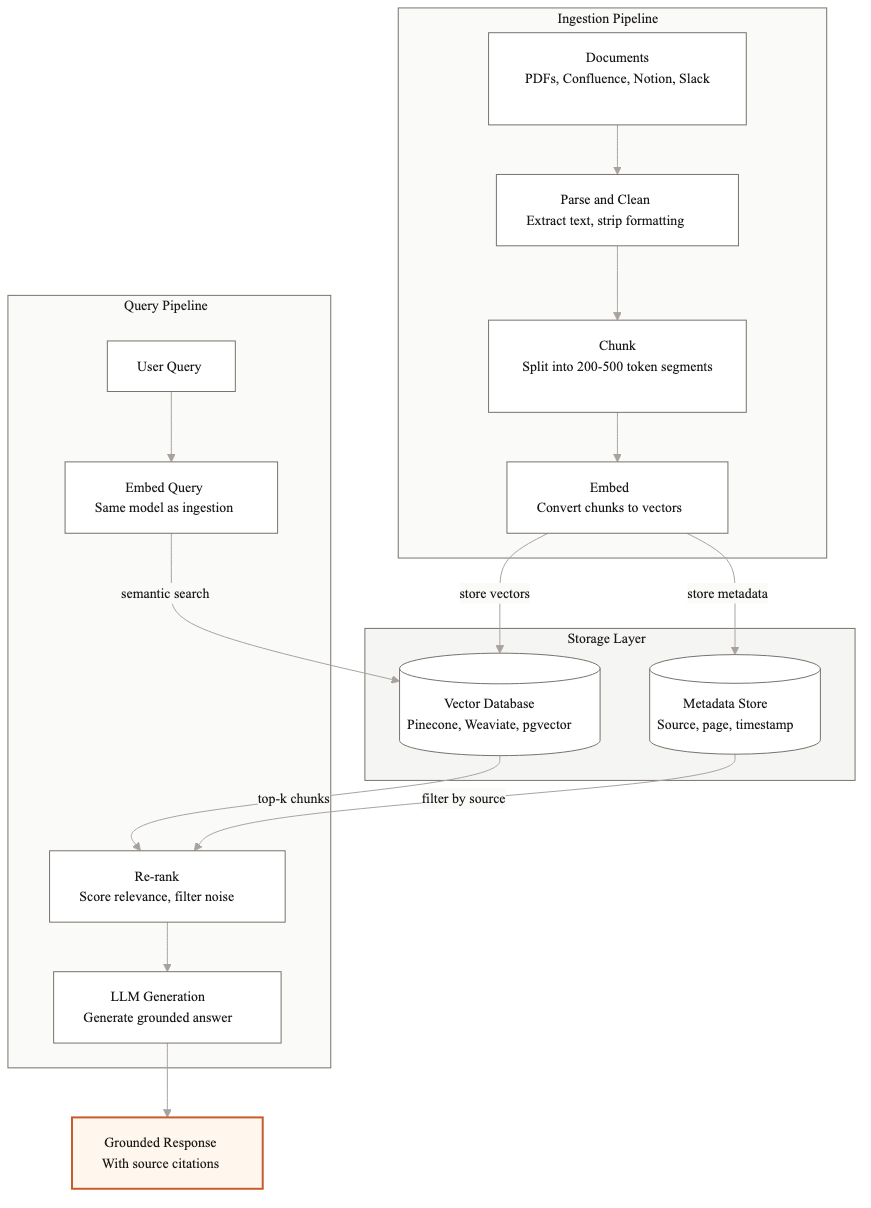
The architecture has five layers: document ingestion, embedding, storage, retrieval, and generation. Each one has real tradeoffs.
Document ingestion pipeline
The ingestion pipeline turns your raw documents into chunks that the system can search. This is where most enterprise RAG projects go wrong first.
Parsing
Enterprise documents are messy. You have PDFs with tables, Word docs with headers and footers, HTML with navigation chrome, Confluence pages with embedded images. The parser needs to extract the actual content and preserve structure. Tables are especially tricky. A table that gets flattened into a single paragraph loses all meaning.
I use different parsers for different formats. Unstructured.io handles most document types well. For PDFs with complex layouts, Azure Document Intelligence or Amazon Textract give better results. For HTML, a custom parser that strips navigation and extracts article content usually beats generic tools.
Chunking strategies
Chunking is how you split documents into pieces for embedding. The chunk size directly affects retrieval quality. Too small and you lose context. Too large and you dilute the signal with irrelevant text.
For most enterprise use cases, I start with 512-token chunks with 50-token overlaps. That is enough to capture a complete thought without pulling in too much noise. But the right size depends on your content. Dense technical documentation can go smaller, around 256 tokens. Long-form narrative content often needs 800-1000 tokens to preserve coherent arguments.
The smarter approach is semantic chunking. Instead of splitting at fixed token counts, you split at paragraph or section boundaries. A section header followed by three paragraphs of explanation should stay together. Tools like LangChain and LlamaIndex support this, but you will need to tune the boundary detection for your specific document structure.
Metadata extraction
Every chunk needs metadata: which document it came from, what section, the publication date, the document type, and any domain-specific tags. This metadata enables filtered retrieval later. When someone asks about Q3 2025 financials, you want to filter by date before running semantic search. Without metadata, the system searches everything and often pulls from the wrong quarter.
I extract metadata at parse time and store it alongside each chunk. For some clients, we use an LLM to generate additional metadata like topic tags or summary sentences per chunk. That adds cost during ingestion but dramatically improves retrieval precision.
Embedding model selection
The embedding model converts your text chunks into vectors that capture semantic meaning. Two pieces of text about the same topic should have similar vectors even if they use different words.
OpenAI's text-embedding-3-large is the safe default for most enterprise projects. It scores well on retrieval benchmarks, runs fast, and costs about $0.13 per million tokens. For teams that need to keep data on-premises, open-source models like BGE-large or E5-mistral are strong alternatives. They require you to host the model yourself, which means managing GPU infrastructure, but they avoid sending data to a third-party API.
The tradeoff between OpenAI and open-source comes down to operational complexity versus data control. If your security team is fine with API calls to OpenAI, use the hosted model. If data cannot leave your network, run an open-source model on your own infrastructure. The accuracy difference is small. The operational difference is large.
Vector database choices
The vector database stores your embeddings and handles similarity search at query time. The four options I see most in production are Pinecone, Weaviate, pgvector, and Qdrant.
Pinecone is fully managed. You do not operate any infrastructure. It scales well and the query performance is consistent. The downside is cost. At scale, Pinecone bills can get substantial, and you are locked into their platform.
Weaviate is open-source with a managed cloud option. It supports hybrid search (vector plus keyword) natively, which matters for retrieval quality. It is more complex to operate than Pinecone but gives you more control.
pgvector is a PostgreSQL extension. If your team already runs Postgres, this is the lowest-overhead option. You add vector search to your existing database without introducing a new system. The performance is good enough for most enterprise workloads up to about 5 million vectors. Beyond that, dedicated vector databases perform better.
Qdrant is open-source and built specifically for vector search. It performs well at scale and supports advanced filtering. I use it for projects where we need fine-grained metadata filtering combined with vector search.
Retrieval strategies
Retrieval is where your architecture either works or falls apart. The question is: given a user query, how do you find the most relevant chunks?
Semantic search
The baseline approach. Embed the query, find the nearest vectors, return the top-k chunks. This works well when the user's language roughly matches the document language. It struggles with acronyms, product names, and exact-match queries like policy numbers.
Hybrid search
Combine semantic search with keyword search (BM25). The semantic component handles meaning. The keyword component handles exact matches. I weight them roughly 70/30 in favor of semantic for most use cases, but this needs tuning per domain. Legal and compliance documents benefit from heavier keyword weighting because specific terms and clause numbers matter.
Re-ranking
Retrieve a larger set of candidates (say top-20) and then run a cross-encoder re-ranker to score each candidate against the original query. The re-ranker is slower but much more accurate than embedding similarity alone. Cohere Rerank and BGE-reranker are the two I use most. This single step can improve retrieval precision by 15-25% in my experience.
For production enterprise systems, I almost always use hybrid search plus re-ranking. The added latency is 100-200ms, which is acceptable for most use cases.
Generation with grounding
Once you have the relevant chunks, you send them to the LLM along with the query. The prompt design here matters more than most teams realize.
The system prompt should instruct the model to answer only from the provided context. If the context does not contain enough information, the model should say so rather than guessing. I also instruct the model to cite which chunk each part of the answer comes from. This is not optional for enterprise. Users need to verify answers against the source.
A common mistake is stuffing too many chunks into the prompt. More context is not better. If you pass 15 chunks and only 3 are relevant, the model has to figure out which ones matter, and it often gets distracted by the irrelevant ones. I typically pass 3-5 chunks after re-ranking. For complex questions that span multiple topics, I run parallel retrievals for each sub-question and merge the results.
Common failure modes
After building dozens of RAG systems, these are the failures I see repeatedly.
- 1Bad chunking. Chunks that split mid-paragraph or mid-table destroy context. The retriever finds the right chunk but it contains only half the information needed for a complete answer.
- 2Missing metadata. Without date, source, and section metadata, the system cannot distinguish between a current policy and an outdated one. This causes wrong answers that look right.
- 3Irrelevant retrieval. The top-k chunks match semantically but do not actually answer the question. This happens when document language is generic. Hybrid search and re-ranking fix most of this.
- 4Context window stuffing. Passing too many chunks dilutes the signal. The model averages across all the context instead of focusing on the most relevant pieces.
- 5No evaluation loop. The team ships the system without a systematic way to measure accuracy. Problems accumulate silently until users lose trust.
- 6Ignoring document updates. The knowledge base changes but the embeddings are stale. New policies exist in the source system but the RAG system still returns old versions.
Getting started
If you are building your first enterprise RAG system, start simple. Use OpenAI embeddings, pgvector, and a basic semantic retrieval pipeline. Get 50 real questions from your users and measure how many the system answers correctly. That baseline will tell you where to invest next.
Most accuracy improvements come from better chunking and metadata, not from switching to a fancier model or a more expensive vector database. Fix the data pipeline first. Optimize the retrieval strategy second. Swap models last.
We build production RAG systems for enterprise teams, typically in 4-8 weeks. If you are evaluating whether RAG is the right approach for your use case, I am happy to walk through your specific situation.
Related guides
AI Agent Architecture Patterns for Enterprise Systems
Most teams pick an agent architecture based on what they saw in a demo. Then they spend months refactoring when it doesn't scale. Here are the four patterns that actually work in production.
What Does Enterprise RAG Actually Cost? A Breakdown
Enterprise RAG costs range from $40K to $150K+ to build, with $2K-$8K in monthly ongoing costs. Here is a full breakdown by component so you can budget accurately.
How to Measure RAG System Accuracy (And Why Most Teams Get It Wrong)
Most RAG evaluations miss what matters. Here are the metrics that actually predict production quality and how to set up an evaluation pipeline that catches problems before your users do.
Related Use Cases
Enterprise Knowledge Base Search with AI
Employees waste hours every week searching for information that exists somewhere in the organization but is impossible to find. We build AI retrieval systems that answer natural language questions accurately, with sources cited.
AI Document Processing and Extraction
Most enterprises process thousands of documents weekly using manual workflows built for a pre-AI world. We replace those workflows with AI systems that extract, validate, and route document data automatically.