Voice AI Agent Architecture: STT, LLM, and TTS in Production
Building a voice AI agent that feels like a natural phone conversation requires getting three layers right: speech-to-text, LLM reasoning, and text-to-speech. Here is how the architecture works in production.
When you call a company and talk to a voice AI agent, three systems run in sequence for every turn of the conversation. Your voice gets converted to text. A language model decides what to say. That text gets converted back to speech. This entire round trip needs to happen in under 500ms for the conversation to feel natural.
I have built these pipelines for contact centers handling 50,000+ calls per month. The architecture decisions at each layer compound. Pick a slow STT provider and your latency budget is gone before the LLM even starts thinking. Choose a TTS voice that sounds robotic and callers hang up in the first 10 seconds. This post covers the production architecture of each layer and the tradeoffs I have seen.
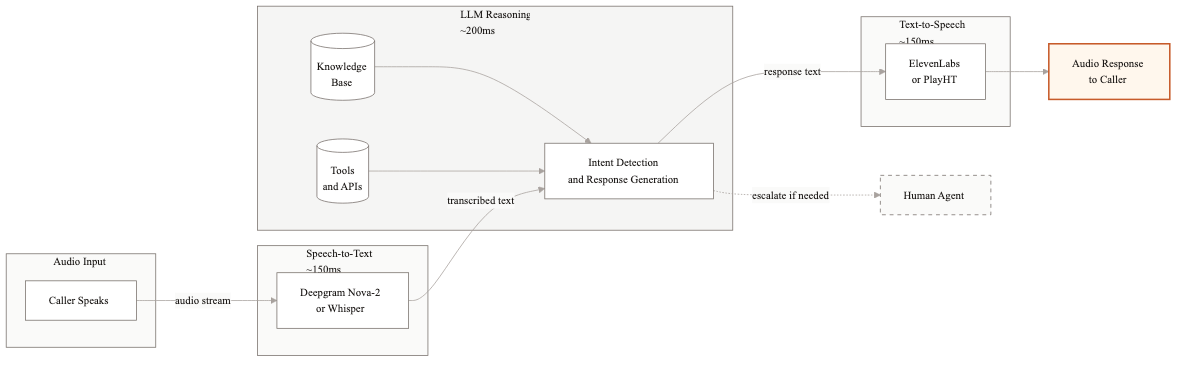
The three-layer pipeline
The fundamental architecture is a pipeline with three stages: Speech-to-Text (STT), Language Model (LLM), and Text-to-Speech (TTS). Audio comes in, gets transcribed, the transcript feeds into the LLM along with conversation history and system context, the LLM generates a text response, and TTS converts that response back to audio that plays to the caller.
Around this core pipeline, you need several supporting systems. A conversation state manager tracks what has happened so far. A tool execution layer lets the LLM call your APIs. An interruption handler detects when the caller starts talking while the agent is still speaking. A telephony integration layer connects everything to your phone system via SIP or WebRTC.
The pipeline runs once per conversational turn. In a typical 3-minute call, that means 15-25 round trips through the full stack. Every round trip is a latency opportunity.
Speech-to-text: where accuracy lives or dies
STT is the foundation. If the transcript is wrong, every downstream decision is wrong. The caller says 'I need to cancel my policy' and the STT outputs 'I need to cancel my proxy.' The LLM has no way to recover from that.
Deepgram
Deepgram is my default choice for production voice AI. Their Nova-2 model handles telephony audio well, supports real-time streaming with latency consistently under 200ms, and their word error rate on business phone calls is around 8-12%. They offer custom vocabulary, which matters when your callers use industry-specific terms or product names. Pricing runs about $0.0043 per minute of audio.
The streaming API sends partial transcripts as the caller speaks, and then a final transcript when it detects an utterance boundary. You can start LLM processing on the final transcript immediately, which saves 100-200ms compared to waiting for a complete silence gap.
OpenAI Whisper
Whisper is the accuracy leader across most benchmarks. Word error rates around 5-8% on general speech. The problem is latency. The standard API processes audio in batch, not streaming. For a 5-second utterance, you wait until the caller finishes, send the audio, and wait another 300-500ms for the transcript. That adds up fast.
Self-hosted Whisper on GPU infrastructure can be configured for streaming, but it requires engineering effort and GPU management. I use Whisper for offline quality evaluation and analytics, where latency does not matter. For the real-time pipeline, Deepgram or AssemblyAI are better fits.
AssemblyAI
AssemblyAI sits between Deepgram and Whisper in both accuracy and latency. Their real-time API is solid, with latency around 250ms. They have strong support for speaker diarization, which helps in conference call scenarios. For standard two-party phone calls, Deepgram edges them out on speed.
LLM layer: the brain of the operation
The LLM receives the transcript, the full conversation history, the system prompt defining the agent's behavior, and any context retrieved from your backend systems. It needs to do several things at once: understand the caller's intent, decide whether to call a tool or respond directly, generate a natural response, and do all of that in under 200ms for the first token.
Model selection for voice
For voice applications, time-to-first-token (TTFT) matters more than raw intelligence. You need the model to start generating quickly because TTS can begin synthesizing as soon as the first sentence arrives. This is why most production voice agents use smaller, faster models.
GPT-4o-mini gives strong reasoning with TTFT around 150-250ms. Claude 3.5 Haiku is comparable in speed with slightly different strengths in following complex instructions. Gemini 1.5 Flash is the fastest of the three, often under 150ms TTFT, with good accuracy on structured tasks. I typically prototype with GPT-4o-mini and test the others to see which performs best on the specific call types.
Using a full-size model like GPT-4o or Claude Sonnet adds 200-400ms of latency per turn. That might sound small, but across a full call it makes the conversation feel sluggish. I reserve large models for offline analysis and complex decision-making that happens outside the real-time loop.
Streaming responses
Every LLM call in the voice pipeline must use streaming. The LLM generates tokens incrementally, and you forward them to TTS as soon as you have a complete sentence. This means the caller starts hearing the response before the LLM has finished generating it. In practice, this shaves 300-600ms off the perceived latency.
The implementation requires a sentence boundary detector between the LLM and TTS. As tokens stream in, you buffer them until you detect a sentence ending (period, question mark, or a natural pause point). Then you send that sentence to TTS immediately while continuing to buffer the next sentence. The TTS generates audio for the first sentence while the LLM is still generating the second.
Tool calling in real time
When the LLM needs to look up an account, check an order status, or process a payment, it calls your backend APIs through function calling. The latency of these API calls adds directly to the response time. A CRM lookup that takes 800ms means 800ms of silence on the call.
I design voice agent APIs with strict latency requirements: 200ms p95 for any call that happens in the real-time path. If a backend system is slower than that, we cache the data or move the lookup to an earlier point in the conversation. For example, pull the customer's full account data during the greeting rather than waiting until they ask a specific question.
Text-to-speech: the voice your callers hear
TTS quality has improved dramatically. Two years ago, every AI voice sounded like a robot reading a script. Today, the best TTS engines produce speech that most callers cannot distinguish from a human for the first minute of conversation.
ElevenLabs
ElevenLabs produces the most natural-sounding voices I have tested. Their Turbo v2 model generates speech with latency around 150-250ms for the first audio chunk. The voice quality includes natural breathing pauses, appropriate intonation shifts, and conversational pacing. They support custom voice cloning if you want your agent to match a specific voice profile.
PlayHT
PlayHT is a strong alternative with slightly lower pricing. Their voices are natural and they offer a good streaming API. Latency is comparable to ElevenLabs. For contact center deployments where you need multiple language support, PlayHT has broader multilingual coverage.
Cloud provider TTS
Google Cloud TTS and Amazon Polly are cheaper options that live within your existing cloud infrastructure. The voice quality is noticeably below ElevenLabs and PlayHT, but good enough for simple informational responses. I use them for IVR-style prompts where naturalness is less critical.
The latency budget
A natural phone conversation has response gaps of 200-500ms between speakers. That is your total budget for the entire pipeline. Here is how I allocate it.
- →STT processing: 150-200ms
- →LLM time-to-first-token: 150-250ms
- →LLM sentence generation: 100-200ms (overlaps with TTS)
- →TTS first audio chunk: 150-250ms
- →Network and telephony overhead: 50-100ms
With streaming and pipelining, the perceived latency is the sum of STT + LLM TTFT + TTS first chunk + network. That lands around 500-800ms in a well-optimized system. Without streaming, you are looking at 1.5-2.5 seconds, which feels terrible on a phone call.
I track p50 and p99 latency separately. Your p50 might be 500ms, which feels great. But if your p99 is 2 seconds, that means 1 in 100 turns has a long awkward pause. Callers notice and it erodes confidence. Keeping p99 under 1 second requires optimizing for the worst case, not just the average.
Interruption handling
In real conversations, people interrupt each other constantly. A caller might say 'actually, wait' while the agent is mid-sentence. If the agent keeps talking, it feels like talking to a recording. Handling interruptions well is what separates a good voice agent from a bad one.
The interruption handler runs alongside the main pipeline. It monitors the audio input stream while TTS output is playing. When it detects the caller speaking (using voice activity detection), it makes a decision: is this a backchannel like 'uh-huh' or 'okay,' or is it a real interruption?
Backchannels should not stop the agent. Real interruptions should. The heuristic I use is duration and volume. Speech under 500ms at normal volume is likely a backchannel. Speech over 500ms or at elevated volume is likely an interruption. When an interruption is detected, the system stops TTS playback within 100-200ms, captures the caller's speech, and feeds it through the normal STT to LLM pipeline.
Getting this wrong in either direction hurts. If the agent stops on every 'uh-huh,' the conversation becomes choppy. If the agent never stops, callers feel ignored. Tuning the interruption threshold for your specific caller population takes real call data and iteration.
Production considerations
Beyond the core pipeline, production voice AI systems need several additional components that do not show up in demos.
Fallback chains are essential. If Deepgram is down, you need an automatic failover to AssemblyAI or Google STT. If your primary LLM provider has a latency spike, the system should route to the backup model. I build three-deep fallback chains for each layer. The caller should never experience a dropped call because of a provider outage.
Call recording and transcript logging feed your improvement loop. Every call should be recorded with the STT transcript, LLM inputs and outputs, and tool calls logged in a structured format. This data is how you find and fix failure patterns. I set up daily automated reports that flag calls where the deflection failed, sorted by failure reason.
Concurrent call handling requires load planning. Each active call consumes STT, LLM, and TTS resources. If you handle 500 concurrent calls at peak, your infrastructure needs to support that without latency degradation. I size for 1.5x peak load to absorb spikes.
We build voice AI agent systems from the ground up, typically getting the first call type live in 6-8 weeks. If you are evaluating the architecture for your contact center, I can walk through what the right stack looks like for your volume and call types.
Related guides
AI Agent Architecture Patterns for Enterprise Systems
Most teams pick an agent architecture based on what they saw in a demo. Then they spend months refactoring when it doesn't scale. Here are the four patterns that actually work in production.
From AI Pilot to Production: The Gap That Kills Most Projects
Your AI pilot worked great. Now it needs to handle 100x the volume, integrate with 5 systems, and not break at 3am. Here is what changes at scale and how to plan for it.
How to Test AI Agents Before They Hit Production
Traditional unit tests don't work for AI agents. The outputs are non-deterministic, the failure modes are subtle, and the edge cases are infinite. Here's a practical testing framework that actually works.
Related Use Cases
AI Customer Support Automation
Customer support teams spend most of their time answering the same questions. We build AI systems that handle the routine volume automatically, so your agents focus on the interactions that actually need a human.